Xiaomi Book Pro 14 2026, Intel X7 358H + B390 - Linux Driver Fixes

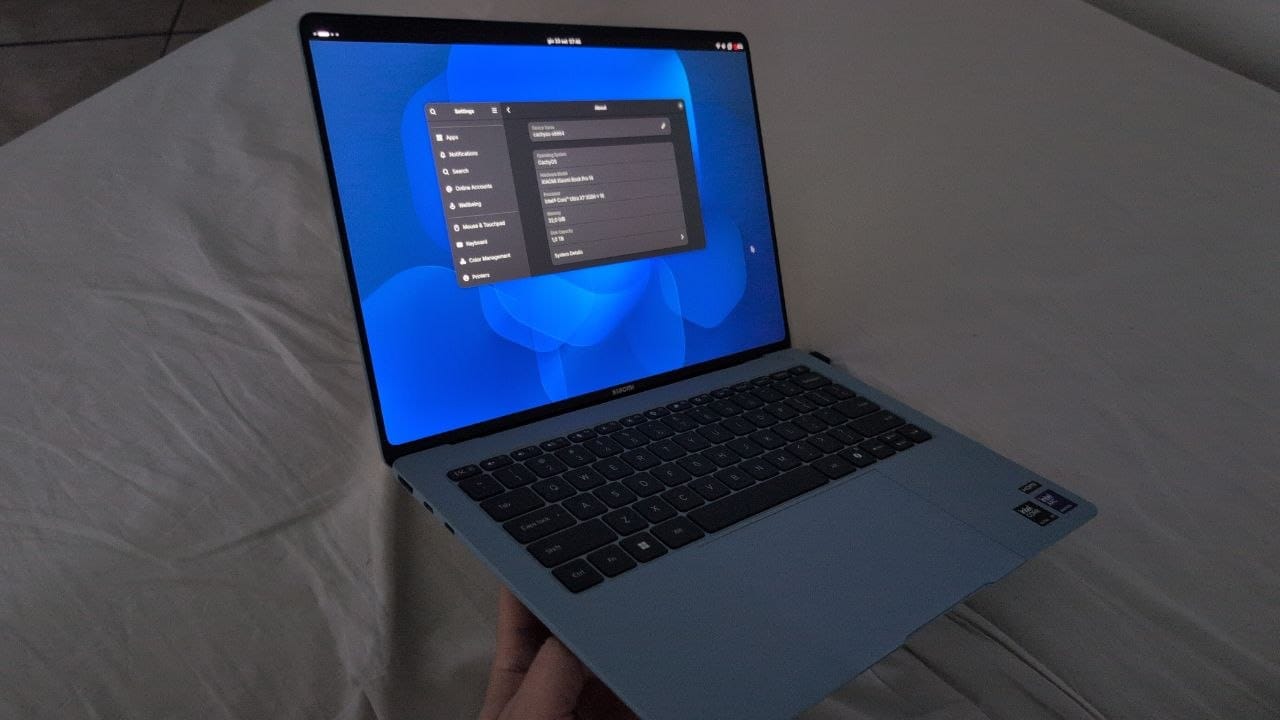
Xiaomi Book Pro 14 2026 works very well with Linux but some tweaks aren't provided by mainstream Linux distros.
Date: 2026-09-12
System: CachyOS (Arch-based), kernel 7.1.5-arch1-2 (6.18.48-1-cachyos-lts as fallback)
Notes: currently the only Linux kernel where everything works is Linux 7.1.5, so pin it. My advice is to use CachyOS, but it should also work with other Linux distros.
System State
| Component | Device | Status After Fix |
|---|---|---|
| GPU | Intel Panther Lake Xe (iGPU) | Working on 7.1.5; RC 7.3 needs full Xe power-save disables (see Fix 1b) |
| Keyboard | i8042 controller | Working (i8042.dumbkbd added) |
| Audio | Intel Panther Lake 8086:e428 (SOF-SoundWire sof-soundwire) |
Working (sof-firmware 2025.12.2-1 pre-installed; default sink fixed to Speaker + Headphone unmuted, see Fix 4) |
| Fingerprint | Goodix 27c6:6890 |
Working (fprintd + libfprint 1.94.100 installed) |
| Suspend | bitland-mifs-wmi | Working (native — module blacklisted, see Fix 9) |
| Performance Mode | power-profiles-daemon / platform_profile | Working (module blacklisted, see Fix 9) |
| Camera | Shinetech 3277:00ff |
Working (detected) |
| Wi-Fi / BT | Intel AX211 160MHz (CNVi 8086:e440) | Working (fix for boot crash & wake from suspend, see Fix 10; BT rfkill fix, see Fix 11) |
| Fn Keys | BIOS Fn Lock | Press Fn+Esc to toggle (default: Fn needed) |
| Touchpad | quicki2c 2808:4001 | Fixed (blacklisted broken drivers, see Fix 5) |
Fix 1: GPU Screen Corruption & Keyboard Not Working
Problem: Built-in keyboard not responding due to ACPI/BIOS issues.
Solution: Added i8042.dumbkbd kernel boot parameter.
Files modified:
/boot/limine.conf— Addedi8042.dumbkbdto all kernel entry cmdlines/etc/default/limine— Addedi8042.dumbkbdtoKERNEL_CMDLINE[default]so future kernel updates persist the fix
Note: xe.enable_psr=0 was already present in the kernel cmdline.
Command used:
# /boot/limine.conf — sed replacement on all cmdline entries
sed -i 's/cmdline: xe.enable_psr=0 quiet/cmdline: xe.enable_psr=0 i8042.dumbkbd quiet/g' /boot/limine.conf

# /etc/default/limine — updated KERNEL_CMDLINE[default]
sed -i 's/KERNEL_CMDLINE\[default\]+="xe.enable_psr=0 quiet/KERNEL_CMDLINE[default]+="xe.enable_psr=0 i8042.dumbkbd quiet/' /etc/default/limine

# Re-enrolled limine config (required after modifying limine.conf)
limine-enroll-config
Fix 1b: Corrupt GPU Framebuffer on linux-cachyos-rc 7.3
Problem: Booting linux-cachyos-rc 7.3.0-rc1 corrupts the internal eDP framebuffer during early DRM init (never reaches userspace — no RC boot ever persisted a journal; all logged boots are LTS). Kernel 7.x reworked the xe display power-saving paths, so xe.enable_psr=0 alone is no longer enough on Panther Lake. PTL firmware is present (ptl_guc_70, ptl_huc, ptl_gsc, linux-firmware 20260810), ruling out missing firmware.
Solution: Disable all four Xe display power-saving features.
Files modified:
/etc/default/limine—KERNEL_CMDLINE[default]now starts withxe.enable_psr=0 xe.enable_panel_replay=0 xe.enable_fbc=0 xe.enable_dc=0(persists across kernel updates)/boot/limine.conf— all 30 cmdline entries patched (mainlinux-cachyos,linux-cachyos-rc,linux-cachyos-lts+ all snapper snapshot entries); backup at/boot/limine.conf.bak- Config enrollment is disabled (
ENABLE_ENROLL_LIMINE_CONFIGcommented out), so no re-enroll needed
Command used:
# /etc/default/limine — prepend the three extra disables
sed -i 's|KERNEL_CMDLINE\[default\]+="xe.enable_psr=0 |KERNEL_CMDLINE[default]+="xe.enable_psr=0 xe.enable_panel_replay=0 xe.enable_fbc=0 xe.enable_dc=0 |' /etc/default/limine

# /boot/limine.conf — patch main + snapshot entries (3 patterns cover all cmdline variants)
sed -i 's|cmdline: xe.enable_psr=0 i8042.dumbkbd quiet|cmdline: xe.enable_psr=0 xe.enable_panel_replay=0 xe.enable_fbc=0 xe.enable_dc=0 i8042.dumbkbd quiet|g' /boot/limine.conf
sed -i 's|cmdline: xe.enable_psr=0 quiet|cmdline: xe.enable_psr=0 xe.enable_panel_replay=0 xe.enable_fbc=0 xe.enable_dc=0 quiet|g' /boot/limine.conf
sed -i 's|cmdline: xe.enable_psr=0 xe.enable_panel_replay=0 quiet|cmdline: xe.enable_psr=0 xe.enable_panel_replay=0 xe.enable_fbc=0 xe.enable_dc=0 quiet|g' /boot/limine.conf
Research results (2026-09-09, 7.3 xe patch search):
- Exact-hardware match: Bazzite #5507 — same Xiaomi Book Pro 14 (TM2424, 8086:b080 rev 04, EDO14.55 OLED 3120x2080@120). 7.1.5 works, 7.2.0 broken with
CPU pipe A FIFO underrun; theirxe.enable_psr=0 xe.enable_dsb=0did NOT help. Still open, no fix. - Prime suspect: upstream
2ee8dbd880b1 "drm/i915/cdclk: Fix up CDCLK_FREQ_DECIMAL without a full PLL re-enable"— confirmed by stable maintainer Sasha Levin (2026-08-14) as culprit for the sibling PTL b082 black-screen regression (7.1.6+). Windows match ours (absent in 7.1.5, present in 7.2.0/7.3-rc1); CDCLK mis-set explains FIFO underruns (black on b082's panel, garbage on ours). No upstream fix/revert as of 2026-09-09. - Other 7.2.0 candidates from ChangeLog-7.2:
drm/i915/wm: clear plane ddb_y on plane disable,drm/i915/mtl+: Enable PPS before PLL, AS SDP/Panel-Replay series,drm/i915/bw: num_planes on TGL+,ltphy SSC bit,drm/xe: Fix DPT allocation paths. - Ruled out: GuC 70.72.1 (working LTS loads it), CachyOS 7.3 patchset (no xe/display patches), missing firmware (all 36 RC xe fw files present), selective-fetch fix (2022, long merged), PTL/WCL detangle (Nov 2025).
- Key diagnostic (no config change): boot RC, close+reopen lid. If display recovers → smoking gun for the CDCLK commit (lid forces full modeset + PLL re-enable).
Working 7.x kernel installed (2026-09-09): vanilla Arch linux + linux-headers 7.1.5.arch1-2 from Arch Archive (last 7.x predating the suspect CDCLK commit in 7.1.6). Boot entry linux in Limine. Pinned via IgnorePkg = linux linux-headers in /etc/pacman.conf so -Syu won't replace it with broken 7.2.x — remove the pin once upstream fixes the regression. linux-cachyos-lts 6.18.48 kept as fallback. Broken entries (linux-cachyos 7.2.3, linux-cachyos-rc 7.3-rc1) left installed for retesting later.
pacman -U "https://archive.archlinux.org/packages/l/linux/linux-7.1.5.arch1-2-x86_64.pkg.tar.zst" "https://archive.archlinux.org/packages/l/linux-headers/linux-headers-7.1.5.arch1-2-x86_64.pkg.tar.zst"
Limine regen (2026-09-09): ran limine-update — rebuilt initramfs for all 4 kernels, all entries regenerated from /etc/default/limine. Regen wiped the hand-added round-2 RC params, so re-appended them to the linux-cachyos-rc main entry afterward.
Fix 2: Fingerprint Sensor (Goodix 27c6:6890)
Problem: fprintd-enroll reported "No devices available" — fprintd/libfprint were not installed.
Solution: Installed fprintd and libfprint from CachyOS repos. The packaged libfprint 1.94.100 already includes Goodix 27c6:6890 support (no need to build from git master as on Fedora).
Packages installed:
fprintd1.94.5-2.1libfprint1.94.100-1.1
PAM configuration:
- GDM fingerprint login was already configured (
/etc/pam.d/gdm-fingerprintcontainspam_fprintd.so) - Added
pam_fprintd.soas optional to/etc/pam.d/system-authfor sudo and TTY login fingerprint support - Backup of original system-auth saved as
/etc/pam.d/system-auth.bak
Commands used:
pacman -S --noconfirm fprintd   # installs libfprint as dependency
systemctl enable --now fprintd

# Add fingerprint to system-auth PAM (after pam_systemd_home line)
sed -i '/^-auth.*pam_systemd_home.so/a auth       optional                    pam_fprintd.so' /etc/pam.d/system-auth
Enrollment (to run after reboot):
fprintd-enroll
Fix 3: Lid Close Suspend (bitland-mifs-wmi)
Problem: Closing the lid did not trigger suspend because the bitland-mifs-wmi driver (Xiaomi WMI platform driver for fan/keyboard backlight/performance mode) returns -EINVAL from its suspend callback, causing the entire suspend to fail.
Solution: Created a systemd-sleep hook that unbinds the WMI device before suspend and rebinds it after resume.
File created: /usr/lib/systemd/system-sleep/bitland-workaround.sh
#!/bin/bash
DEV="B60BFB48-3E5B-49E4-A0E9-8CFFE1B3434B-4"
case $1 in
  pre)
    echo -n "$DEV" > /sys/bus/wmi/drivers/bitland-mifs-wmi/unbind 2>/dev/null
    ;;
  post)
    echo -n "$DEV" > /sys/bus/wmi/drivers/bitland-mifs-wmi/bind 2>/dev/null
    ;;
esac
Note: Only s2idle (default) works. deep (S3) causes the system to hang on resume due to BIOS bugs. Do NOT set mem_sleep_default=deep.
⚠ Now redundant: Fix 9 blacklists bitland_mifs_wmi entirely, so this workaround is a harmless no-op (both commands redirect stderr to /dev/null). The script can be kept or removed — it does nothing either way.
Fix 4: No Audio — Wrong Default Sink (Deepbuffer Jack Out) + Muted Headphone
Problem: No sound. PipeWire default sink was playback.31.0 (Deepbuffer Jack Out (*), hw:0,31) — headphone low-power offload path — instead of Speaker. ALSA Headphone control was [off]. PipeWire also logged spa.alsa: hw:0,31p: Channels doesn't match (requested 64, got 2) / audio.channels 64 out of range:2-2, so the deepbuffer node is unreliable (reports 64ch).
Diagnosis (2026-09-09):
pactl info→Default Sink: alsa_output.pci-0000_00_1f.3-platform-sof_sdw.playback.31.0wpctl status→* 60. ... (Deepbuffer Jack Out (*)), Speaker is sink55(playback.2.0,hw:0,2, SUSPENDED, 100%, unmuted)amixer -c 0 sget Headphone→Mono: Playback [off](Speaker was[on], volumes 100%)aplay -l→card 0: sofsoundwire:0 Jack Out,2 Speaker,5/6/7 HDMI1/2/3,31 Deepbuffer Jack Out; driversof-audio-pci-intel-ptlon00:1f.3(Xiaomi TM2424)speaker-test -c 2 -t wav -l 1via PipeWire OK; directspeaker-test -D hw:0,2→-16 Device busy(expected, held by PipeWire)
Solution: Unmute Headphone at ALSA level, set default sink to Speaker (55 / playback.2.0), persist both.
Commands used:
amixer -c 0 sset Headphone on
wpctl set-default 55   # alsa_output.pci-0000_00_1f.3-platform-sof_sdw.playback.2.0 (Speaker (*))
alsactl store          # persist Headphone [on] (WirePlumber persists default sink automatically)
Notes:
- For wired headphones use normal
Jack Out (*)(sink53,hw:0,0), NOTDeepbuffer Jack Out(sink60,hw:0,31). - For external monitor use
HDMI 1/2/3(sinks57/58/59). - If sound breaks again:
Settings > Sound > Output→ pick Speaker, check 100% + not muted;pactl get-sink-mute @DEFAULT_SINK@;amixer -c 0 sget Headphone. - Maintenance (2026-09-12):
alsactl storedid not persist the Headphone unmute across a reboot — Headphone reverted to[off]. Re-ranamixer -c 0 sset Headphone on && alsactl store. If this recurs after kernel or PipeWire updates, re-run:amixer -c 0 sset Headphone on && alsactl store.
Fix 5: Touchpad Not Working (quicki2c 2808:4001)
Problem: Touchpad not responding. The intel_thc/intel_quicki2c drivers incorrectly grab the touchpad device, producing a spurious "haptic pointer" (quicki2c-hid 2808:4001) that conflicts with the real touchpad.
Solution: Blacklist the broken drivers and ignore the haptic device via udev.
File created: /etc/modprobe.d/blacklist-thc.conf
blacklist intel_thc
blacklist intel_quicki2c
File created: /etc/udev/rules.d/99-xiaomi-touchpad.rules
KERNEL=="event*", ATTRS{name}=="quicki2c-hid 2808:4001", ENV{LIBINPUT_IGNORE_DEVICE}="1"
Commands used:
sudo tee /etc/modprobe.d/blacklist-thc.conf > /dev/null << 'EOF'
blacklist intel_thc
blacklist intel_quicki2c
EOF

sudo tee /etc/udev/rules.d/99-xiaomi-touchpad.rules > /dev/null << 'EOF'
KERNEL=="event*", ATTRS{name}=="quicki2c-hid 2808:4001", ENV{LIBINPUT_IGNORE_DEVICE}="1"
EOF

sudo udevadm control --reload-rules
sudo udevadm trigger
Note: Reboot required for module blacklist to take effect. After reboot, touchpad works via i2c-hid + hid-multitouch (the real touchpad is BLTP7853:00 347D:7853 Touchpad on event11).
Maintenance (2026-09-12): The blacklist-thc.conf file was found empty — intel_thc and intel_quicki2c were loaded, breaking the touchpad. Re-created the file. If the touchpad stops working, check lsmod | grep -E 'quicki2c|intel_thc' — if either is loaded, the blacklist file needs recreation:
echo -e "blacklist intel_thc\nblacklist intel_quicki2c" | sudo tee /etc/modprobe.d/blacklist-thc.conf
Fix 6: Special Keys (Fn Keys, Volume, Brightness)
Problem: Volume and brightness keys required holding Fn (i.e., had to press Fn+F-keys instead of directly). This is the factory default — not a Linux bug.
Root Cause: The laptop ships with Fn Lock disabled. The bitland-mifs-wmi driver supports Fn Lock via WMI (event ID 7 / function 11), and the BIOS exposes this as a toggleable setting.
Solution: Toggle Fn Lock in BIOS or via key combination.
To enable Fn Lock (make special keys default):
- Method 1 (keyboard): Press
Fn + Esc— toggles Fn Lock on/off. When Fn Lock is ON, the F-row defaults to special keys (volume, brightness, etc.) without holding Fn. - Method 2 (BIOS): Enter BIOS/UEFI setup (usually F2 at boot) → Advanced or Configuration → find "Function Key Mode", "Fn Lock", or "F1-F12 as Multimedia Keys" → set to Enabled.
Details (from investigation):
- The
bitland-mifs-wmidriver handles Fn Lock state changes (eventWMI_EVENT_FNLOCK_STATE = 7) and can set the Fn Lock state viaWMI_FN_FN_LOCK = 11. - The BIOS Fn Lock is independent of Linux — it's a firmware feature that persists across reboots.
- Volume keys (KEY_VOLUMEDOWN/UP, KEY_MUTE) are handled by
gsd-media-keysvia PipeWire. - Screen brightness keys (KEY_BRIGHTNESSDOWN/UP) are handled by Mutter via the
org.gnome.Mutter.DisplayConfig.SetBacklightD-Bus interface. - Keyboard backlight is handled by the
bitland-mifs-wmidriver via theleds:bitland-mifs-wmi::kbd_backlightLED device.
Fix 7: NetworkManager Invalid Config Key (wifi.p2p.disabled)
Problem: /etc/NetworkManager/conf.d/no-p2p.conf contained wifi.p2p.disabled=true, which is not a valid NetworkManager key in NM 1.58.1. This caused:
- "unknown key 'wifi.p2p.disabled'" warning on every NM start/reload
p2p-dev-wlan0IPv4 forwarding errors (error setting IPv4 forwarding to '0')wpa_supplicantinterface initialization failures when iwlwifi firmware crashes (the P2P device still exists regardless of the config)
Root Cause: The wifi.p2p.disabled key was likely copied from an older guide; NM never supported this key. The p2p virtual interface is created by the kernel/iwlwifi driver and cannot be suppressed from NM config alone.
Solution: Remove the invalid config file.
File removed: /etc/NetworkManager/conf.d/no-p2p.conf
Commands used:
sudo rm /etc/NetworkManager/conf.d/no-p2p.conf
sudo systemctl restart NetworkManager
Note: The p2p-dev-wlan0: error setting IPv4 forwarding to '0': Success warning is a known NM cosmetic quirk — it reports "error" but the result is "Success". It has zero functional impact. Fully suppressing the p2p interface would require a udev rule (not worth the effort).
Fix 8: upowerd GLib Warnings
Problem: upowerd (v1.91.3-1.1) emitted repeated GLib assertion failures:
instance with invalid (NULL) class pointer
signal_emit_valist_unlocked: assertion 'G_TYPE_CHECK_INSTANCE (instance)' failed
~425 messages in 7 days. This is a known GObject type system bug in upower/GLib interaction.
Battery health is fine:
- Capacity: 100% (70.284 Wh / 68.224 Wh design)
- 7.7h estimated runtime at current load
- No OOM events, no hardware issues
Solution: Updated all packages and restarted the upower service. Same version reinstalled (1.91.3-1.1 is latest available) — the restart clears accumulated warning state.
Commands used:
sudo pacman -Syu upower   # update all packages
sudo systemctl restart upower
Note: If warnings persist after a few hours, it's an upstream bug with no functional impact. The battery reports correctly via upower -i /org/freedesktop/UPower/devices/battery_BAT0.
Fix 9: Performance Mode Broken (power-profiles-daemon / platform_profile)
Problem: GNOME Power Settings shows a "Performance" mode toggle, but enabling it fails silently. powerprofilesctl set performance also fails:
Failed to communicate with power-profiles-daemon: g-io-error-quark:
Failed to activate platform driver 'platform_profile': Failed to write to
acpi_platform_profile: Error writing '/sys/firmware/acpi/platform_profile':
Operation not supported
Root Cause: The bitland-mifs-wmi driver (Xiaomi WMI platform driver) registers as a platform_profile handler but does not properly implement the set/get operations. When power-profiles-daemon tries to write to /sys/firmware/acpi/platform_profile, the broken handler intercepts and returns -EOPNOTSUPP. Kernel dmesg shows repeated platform_profile: Failed to get profile for handler bitland-mifs-wmi errors.
Reading /sys/firmware/acpi/platform_profile_choices works (shows low-power balanced performance), but writing to /sys/firmware/acpi/platform_profile always fails while the module is loaded.
Solution: Blacklist bitland_mifs_wmi. This removes the broken handler, allowing the platform_profile subsystem to work through the fallback ACPI path (or power-profiles-daemon uses intel_pstate directly).
Side benefit: Suspend also works natively without the Fix 3 workaround — the bitland-mifs-wmi suspend callback that returned -EINVAL is no longer called since the driver never loads. The existing sleep script (/usr/lib/systemd/system-sleep/bitland-workaround.sh) is now a harmless no-op (both commands redirect stderr to /dev/null).
File created: /etc/modprobe.d/disable-bitland-mifs-wmi.conf
blacklist bitland_mifs_wmi
Commands used:
# Temporary (works immediately, lost on reboot):
sudo modprobe -r bitland_mifs_wmi

# Permanent (persists across reboots):
echo "blacklist bitland_mifs_wmi" | sudo tee /etc/modprobe.d/disable-bitland-mifs-wmi.conf
Trade-offs of blacklisting bitland_mifs_wmi:
- Lost: Keyboard backlight control (
leds:bitland-mifs-wmi::kbd_backlight), proprietary fan control (if any was working), WMI-based Fn Lock state changes - Gained: Performance mode, balanced/power-saver mode switching, native suspend (no unbind workaround needed)
- Fn Lock: Still works via BIOS toggle (
Fn+Escor BIOS setup) — the BIOS-level Fn Lock is independent of the driver
Notes:
- The GNOME Power Settings → Performance toggle now works because
power-profiles-daemoncan successfully write toplatform_profilewithout the broken handler interfering. - If you ever need to re-enable the driver, remove the blacklist file and reload:
sudo rm /etc/modprobe.d/disable-bitland-mifs-wmi.conf && sudo modprobe bitland_mifs_wmi - Other platform_profile handlers (e.g.,
acpi-platform) may take over if available, providing the actual performance mode switching via ACPI.
Fix 10: Wi-Fi Firmware Crash on Boot & After Suspend (iwlwifi)
Problem: Wi-Fi completely dead on boot (no wlan0 interface) and crashes after resume from suspend. The Intel CNVi Wi-Fi 6E AX211 160MHz firmware fails during INIT ucode loading with Microcode SW error detected. Restarting 0x0. Failed to run INIT ucode: -5.
Root Cause: Multiple issues converged:
- Boot-time crash: The modprobe options
fw_restart=0,enable_ini=0, andamsdu_size=0in/etc/modprobe.d/iwlwifi.confcaused the firmware to fail during initialization.fw_restart=0prevented the driver from recovering after crashes;enable_ini=0disabled the INI configuration system needed for Panther Lake;amsdu_size=0disabled AMSDU which interfered with firmware init. - Suspend crash: After the boot fix was applied, the firmware still crashes on resume from suspend — a known CNVi bug on Panther Lake where the firmware state is corrupted during s2idle.
- Redundant mechanisms: Five competing mechanisms (kernel params, modprobe options, NM config, system-sleep hook, two systemd services) created conflicts.
Solution:
- Simplified iwlwifi options to
power_save=0only (removedfw_restart=0 enable_ini=0 amsdu_size=0). - Updated kernel cmdline params to match.
- Consolidated suspend/resume recovery to a single system-sleep hook.
- Removed all redundant/competing mechanisms.
Changes Made
Removed (competing with system-sleep hook):
/etc/systemd/system/iwlwifi-fix.service— systemd service (WantedBy=suspend.target)/etc/systemd/system/iwlwifi-wake.service— systemd service (WantedBy=sleep.target)/usr/local/bin/iwlwifi-fix.sh— script called by both services
Updated: /etc/modprobe.d/iwlwifi.conf — simplified options
options iwlwifi power_save=0
Removed: /etc/modprobe.d/iwlwifi.conf — DEPRECATED (2026-09-12)
The modprobe options file has been removed entirely. The previous options (fw_restart=0 enable_ini=0 amsdu_size=0 disable_11ax=0 disable_11be=0) caused the firmware crash. The kernel cmdline parameter iwlwifi.power_save=0 provides the same functionality. If you need additional options in the future, add them directly to /etc/default/limine in KERNEL_CMDLINE[default] to persist across kernel updates.
Note: The file /etc/modprobe.d/iwlwifi-power.conf now exists with just power_save=0. This is the current configuration.
Rewritten: /usr/lib/systemd/system-sleep/iwlwifi-reset.sh
#!/bin/bash
# iwlwifi suspend/resume fix for Intel Core Ultra Series 3 (Panther Lake) CNVi Wi-Fi
# Device: Intel Wi-Fi 6E AX211 160MHz (8086:e440)

LOG="/tmp/iwlwifi-resume.log"

log() {
    echo "$(date '+%Y-%m-%d %H:%M:%S'): $*" >> "$LOG"
}

case "$1" in
    post)
        case "$2" in
            suspend|hybrid-sleep|suspend-then-hibernate)
                log "=== Resume detected ($2) ==="
                sleep 2

                # Skip reset if WiFi already works
                if ip link show wlan0 up &>/dev/null && ping -c1 -W2 8.8.8.8 &>/dev/null; then
                    log "WiFi already working, skipping reset"
                    exit 0
                fi

                log "WiFi not functional, starting reset"

                # Stop NetworkManager cleanly
                systemctl stop NetworkManager 2>/dev/null || true
                sleep 1
                ip link set wlan0 down 2>/dev/null || true

                # Unload and reload iwlwifi modules
                rmmod iwlmvm 2>/dev/null || true
                rmmod iwlwifi 2>/dev/null || true
                sleep 1
                modprobe iwlwifi || { log "ERROR: failed to load iwlwifi"; exit 1; }
                modprobe iwlmvm || { log "ERROR: failed to load iwlmvm"; exit 1; }
                sleep 3

                ip link set wlan0 up 2>/dev/null || true
                systemctl start NetworkManager 2>/dev/null || true
                sleep 5

                if ip link show wlan0 up &>/dev/null; then
                    log "WiFi reset successful, interface is up"
                else
                    log "WARNING: interface may not be fully functional"
                fi
                log "=== Reset complete ==="
                ;;
        esac
        ;;
esac
Key improvements over old script:
- Tests if WiFi already works before resetting (avoids unnecessary disruption)
- Uses
systemctl stop/start NetworkManagerinstead ofnmcli device set(cleaner, more reliable) - Proper logging with timestamps to
/tmp/iwlwifi-resume.log
Preserved (all correct):
/etc/modprobe.d/iwlwifi.conf→ REMOVED (2026-09-12). See above. The old options caused the firmware crash.- Kernel params:
iwlwifi.power_save=0(only this parameter;enable_ini=0was removed)
/etc/NetworkManager/conf.d/disable-wifi-powersave.conf:
[device]
wifi.powersave = 2
Current config: /etc/modprobe.d/iwlwifi-power.conf contains:
options iwlwifi power_save=0
Maintenance (2026-09-12): The /etc/modprobe.d/iwlwifi.conf file was found to contain fw_restart=0 enable_ini=0 amsdu_size=0 which caused a boot-time firmware crash (Microcode SW error detected. Failed to run INIT ucode: -5). The file was deleted and replaced with a minimal /etc/modprobe.d/iwlwifi-power.conf containing only power_save=0. If Wi-Fi stops working again, verify the modprobe config does NOT contain fw_restart=0 or enable_ini=0:
cat /etc/modprobe.d/iwlwifi.conf 2>&1   # should be "No such file" or empty
cat /etc/modprobe.d/iwlwifi-power.conf 2>&1  # should show: options iwlwifi power_save=0
Commands Used
# Disable and remove competing systemd services
sudo systemctl disable iwlwifi-fix.service iwlwifi-wake.service
sudo rm /etc/systemd/system/iwlwifi-fix.service /etc/systemd/system/iwlwifi-wake.service
sudo rm /usr/local/bin/iwlwifi-fix.sh
sudo systemctl daemon-reload

# Remove the problematic modprobe config (caused firmware crash)
sudo rm /etc/modprobe.d/iwlwifi.conf

# Create minimal config with only power_save=0
sudo tee /etc/modprobe.d/iwlwifi-power.conf > /dev/null << 'EOF'
options iwlwifi power_save=0
EOF

# Rewrite the system-sleep hook
sudo tee /usr/lib/systemd/system-sleep/iwlwifi-reset.sh > /dev/null << 'SCRIPT'
#!/bin/bash
LOG="/tmp/iwlwifi-resume.log"
log() { echo "$(date '+%Y-%m-%d %H:%M:%S'): $*" >> "$LOG"; }
case "$1" in
    post)
        case "$2" in
            suspend|hybrid-sleep|suspend-then-hibernate)
                log "=== Resume detected ($2) ==="
                sleep 2
                if ip link show wlan0 up &>/dev/null && ping -c1 -W2 8.8.8.8 &>/dev/null; then
                    log "WiFi already working, skipping reset"
                    exit 0
                fi
                log "WiFi not functional, starting reset"
                systemctl stop NetworkManager 2>/dev/null || true
                sleep 1
                ip link set wlan0 down 2>/dev/null || true
                rmmod iwlmvm 2>/dev/null || true
                rmmod iwlwifi 2>/dev/null || true
                sleep 1
                modprobe iwlwifi || { log "ERROR: failed to load iwlwifi"; exit 1; }
                modprobe iwlmvm || { log "ERROR: failed to load iwlmvm"; exit 1; }
                sleep 3
                ip link set wlan0 up 2>/dev/null || true
                systemctl start NetworkManager 2>/dev/null || true
                sleep 5
                if ip link show wlan0 up &>/dev/null; then
                    log "WiFi reset successful, interface is up"
                else
                    log "WARNING: interface may not be fully functional"
                fi
                log "=== Reset complete ==="
                ;;
        esac
        ;;
esac
SCRIPT
sudo chmod +x /usr/lib/systemd/system-sleep/iwlwifi-reset.sh
Fix 11: Bluetooth Soft-Blocked at Boot (rfkill)
Problem: Bluetooth is rfkill soft-blocked at boot. bluetoothd logs Failed to set mode: Failed (0x03) because the controller is blocked before it can initialize. rfkill list shows Soft blocked: yes. Bluetooth must be manually unblocked (rfkill unblock bluetooth) after each boot.
Root Cause: Race condition between systemd-rfkill state restore and bluetooth.service startup. The saved rfkill state file (/var/lib/systemd/rfkill/pci-0000:00:14.7:bluetooth) contains 0 (unblocked), but something blocks BT between the state restore and bluetoothd initialization. Likely a GNOME power management race — gsd-power or gnome-shell may rfkill-block BT before bluetoothd finishes starting.
Solution: Add a systemd drop-in that runs rfkill unblock bluetooth after bluetooth.service starts.
File created: /etc/systemd/system/bluetooth.service.d/override.conf
[Service]
ExecStartPost=/bin/bash -c 'sleep 1 && /usr/bin/rfkill unblock bluetooth'
Commands used:
sudo mkdir -p /etc/systemd/system/bluetooth.service.d
sudo tee /etc/systemd/system/bluetooth.service.d/override.conf > /dev/null << 'EOF'
[Service]
ExecStartPost=/bin/bash -c 'sleep 1 && /usr/bin/rfkill unblock bluetooth'
EOF
Note: No reboot needed — the drop-in takes effect on next boot. To test immediately: sudo systemctl restart bluetooth && sleep 2 && rfkill list bluetooth (should show Soft blocked: no).
Known Cosmetic Boot Errors (No Fix Needed)
These errors appear in journalctl -b -p err on every boot and are harmless:
| Error | Source | Explanation |
|---|---|---|
ACPI BIOS Error: Could not resolve symbol [...Q_EC._STA.ECON] |
kernel | Xiaomi BIOS bug — Embedded Controller ACPI methods reference missing symbols. No functional impact. |
ACPI Error: AE_NOT_FOUND, While resolving \_SB_.IETM.TFN1 |
kernel | Missing thermal zone reference in BIOS. Cosmetic. |
integrity: Problem loading X.509 certificate -65 |
kernel | Secure Boot certificate not enrolled or expired. Only matters if using Secure Boot module signing. |
intel_ish_ipc: ISH loader: cmd 2 failed 10 |
kernel | Integrated Sensor Hub firmware loading race on Panther Lake. ISH handles accelerometer/gyroscope — not critical for basic operation. |
i801_smbus: SMBus is busy, can't use it! |
kernel | SMBus controller contention during boot — multiple drivers racing. No functional impact. |
iwlwifi: Sorry - debug buffer is only 4096K while you requested 65536K |
kernel | iwlwifi debug buffer size mismatch. Informational only. |
intel_lpmd: Open /sys/kernel/debug/x86/sched_itmt_enabled failed |
intel_lpmd | ITMT scheduler knob missing. lpmd works fine without it. |
virt/tdx: TDX not supported by the host platform |
kernel | TDX (Trust Domain Extensions) not available on this hardware. Cosmetic. |
wpa_supplicant: nl80211: multicast RX registrations are not supported |
wpa_supplicant | Kernel limitation on this nl80211 version. Cosmetic. |
gkr-pam: unable to locate daemon control file |
gdm-password | GNOME Keyring not yet initialized at GDM login. Resolves after session starts. |
⚠ NOT cosmetic: Microcode SW error detected. Restarting 0x0. Failed to run INIT ucode: -5 — This was the boot-time Wi-Fi crash caused by fw_restart=0, enable_ini=0, and amsdu_size=0 in /etc/modprobe.d/iwlwifi.conf. Fixed (2026-09-12) by removing the modprobe config file. If this error appears again, check /etc/modprobe.d/iwlwifi.conf — it should NOT exist. The correct config is /etc/modprobe.d/iwlwifi-power.conf with only options iwlwifi power_save=0.
Verification After Reboot
# GPU / Keyboard
cat /proc/cmdline | grep -o "i8042.dumbkbd"    # should show: i8042.dumbkbd

# GPU on linux-cachyos-rc 7.3 (after booting the RC entry)
cat /proc/cmdline | grep -o "xe\.enable_[a-z_]*=0"   # should show all 4: psr, panel_replay, fbc, dc
journalctl -k --grep="xe.*(ERROR|timed out)"          # should be empty on a clean boot

# Fingerprint
fprintd-list $(whoami)                          # should list Goodix sensor
fprintd-enroll                                  # enroll your fingerprint

# Audio
cat /proc/asound/cards                          # should show Intel sound card
aplay -l                                        # should list playback devices
pactl info | grep "Default Sink"                # should show: ...playback.2.0 (Speaker)
pactl get-sink-mute @DEFAULT_SINK@              # should show: Mute: no
amixer -c 0 sget Headphone | grep Playback      # should show: Mono: Playback [on]

# Suspend
systemctl suspend                               # test lid close / manual suspend
journalctl -b | grep bitland                    # check for unbind/rebind messages

# Touchpad (after reboot)
libinput list-devices | grep -A5 "Touchpad"     # should show BLTP7853 touchpad
lsmod | grep -E "quicki2c|intel_thc"            # should be empty (blacklisted)

# Fn Lock
# Press Fn+Esc to toggle, then test:
# - Volume keys should work without Fn
# - Brightness keys should work without Fn
# - F1-F12 should still work with Fn held

# NetworkManager (Fix 7)
ls /etc/NetworkManager/conf.d/no-p2p.conf   # should fail (file removed)
journalctl -u NetworkManager --since "5 min ago" | grep "unknown key"  # should be empty

# upower (Fix 8)
systemctl status upower                      # check active (running)
journalctl -u upower --since "5 min ago" | grep "NULL"  # should be empty

# Performance Mode (Fix 9)
lsmod | grep bitland                         # should be empty (blacklisted)
powerprofilesctl get                         # should show: performance (or balanced)
powerprofilesctl set performance             # should succeed without error
powerprofilesctl set balanced                # should succeed without error
cat /sys/firmware/acpi/platform_profile_choices  # should show: low-power balanced performance

# Suspend (Fix 3 — now native, no workaround needed since Fix 9 blacklisted bitland)
systemctl suspend                            # should work without unbind/rebind
journalctl -b | grep bitland                 # should be empty (module not loaded)
# Note: /usr/lib/systemd/system-sleep/bitland-workaround.sh still exists but is a harmless no-op

# Wi-Fi (Fix 10)
lsmod | grep iwl                             # should show: iwlmvm iwlwifi mac80211 cfg80211
cat /proc/cmdline | grep -o 'iwlwifi\.[^ ]*' # should show: iwlwifi.power_save=0
cat /etc/modprobe.d/iwlwifi-power.conf       # should show: options iwlwifi power_save=0
ls /etc/modprobe.d/iwlwifi.conf 2>&1         # should show: No such file (removed, was causing crash)
cat /etc/NetworkManager/conf.d/disable-wifi-powersave.conf  # verify wifi.powersave = 2
systemctl is-enabled iwlwifi-fix.service 2>&1  # should show: not-found (removed)
systemctl is-enabled iwlwifi-wake.service 2>&1 # should show: not-found (removed)
ls /usr/local/bin/iwlwifi-fix.sh 2>&1          # should show: No such file (removed)

# Test suspend/resume WiFi recovery:
systemctl suspend
# After wake, check:
nmcli device status                            # wlan0 should be connected
cat /tmp/iwlwifi-resume.log                    # should show reset log (or "skipping reset" if WiFi survived)

# Bluetooth (Fix 11)
rfkill list bluetooth                          # should show: Soft blocked: no
bluetoothctl show | grep Powered               # should show: Powered: yes
cat /etc/systemd/system/bluetooth.service.d/override.conf  # verify drop-in exists