My Second Attempt at a Minimalist Linux Desktop: cosmic-comp + noctalia

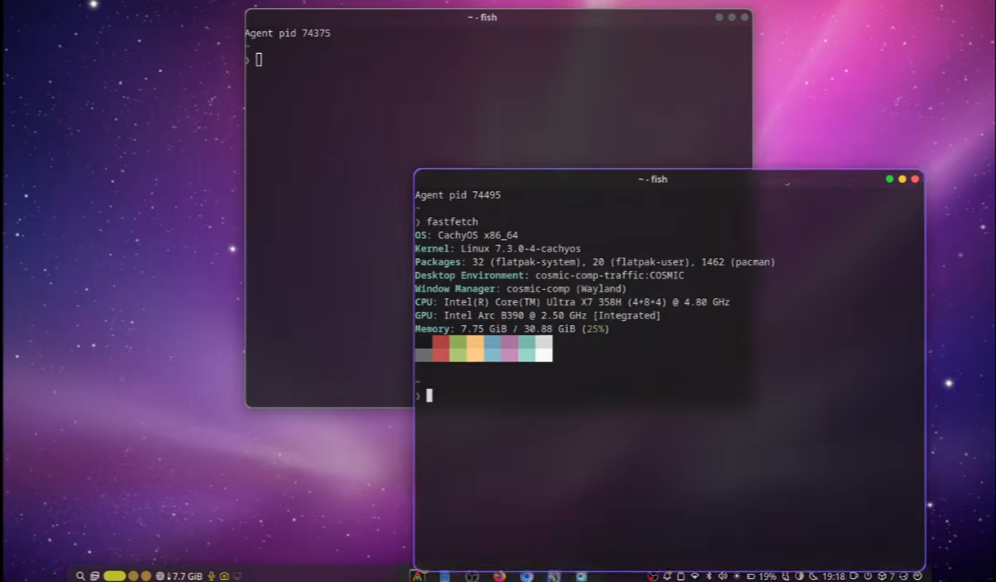
I've been working on building a modern, minimal Linux desktop. It's
incredibly fast and focuses on a clean aesthetic without sacrificing
functionality. Here's a breakdown of the setup I'm using.
The Core: Cosmic Comp (Traffic patches)
The foundation of this setup is a patched version of the Wayland
compositor called cosmic-comp-traffic. While the standard Cosmic desktop
is great, I needed specific improvements that required patching the source
code.
Key Improvements & Patches:
- macOS-style Traffic Lights: I modified the source code to include the
classic macOS window control icons. - Noctalia Integration: One of the biggest hurdles was getting Cosmic
Comp to expose open applications to other docks. I've patched it so that
Noctalia can now display the yellow indicator dots for active apps. - Custom Alt-Tab Behavior: By default, the Alt-Tab cycle opens a popup.
I've changed this behavior to cycle directly through open apps for a
faster workflow. - Night Mode Support: Cosmic Desktop's default color configurations didn't
include a proper red filter for night use. I patched the configuration
to enable a proper red filter to reduce eye strain.
Note: This is a fork. You can find the package on GitHub for Arch Linux,
or you can compile it from the source. This setup is definitely intended
for users who are comfortable managing Linux internals.
The Interface: Noctalia Shell
For the dock and status bar, I'm using Noctalia. It's highly configurable
and much easier to customize than GNOME, where you often have to hunt down
dozens of different extensions to get basic features.
Features I Use:
- Transparency and Blur: It handles these beautifully, provided the
compositor supports them. - System Monitoring: I have it configured to show real-time RAM usage
directly in the bar. - Built-in Tools: It includes integrated notifications, screen luminosity
controls, and a toggle for night mode. - Inhibit Standby: There's a handy feature to keep the screen on and
prevent the system from going into standby when needed.
Performance
The main goal was to keep things lightweight. This setup is extremely
efficient-running a minimal session with only these core services uses
only about 1 GB of RAM.
If you're looking for a fast, floating window manager with great
transparency and a minimal footprint, this experiment might be worth
looking into.
https://github.com/grigio/cosmic-comp-traffic
https://github.com/grigio/cosmic-comp-traffic-session